
oncut Prism
Camera metadata panel
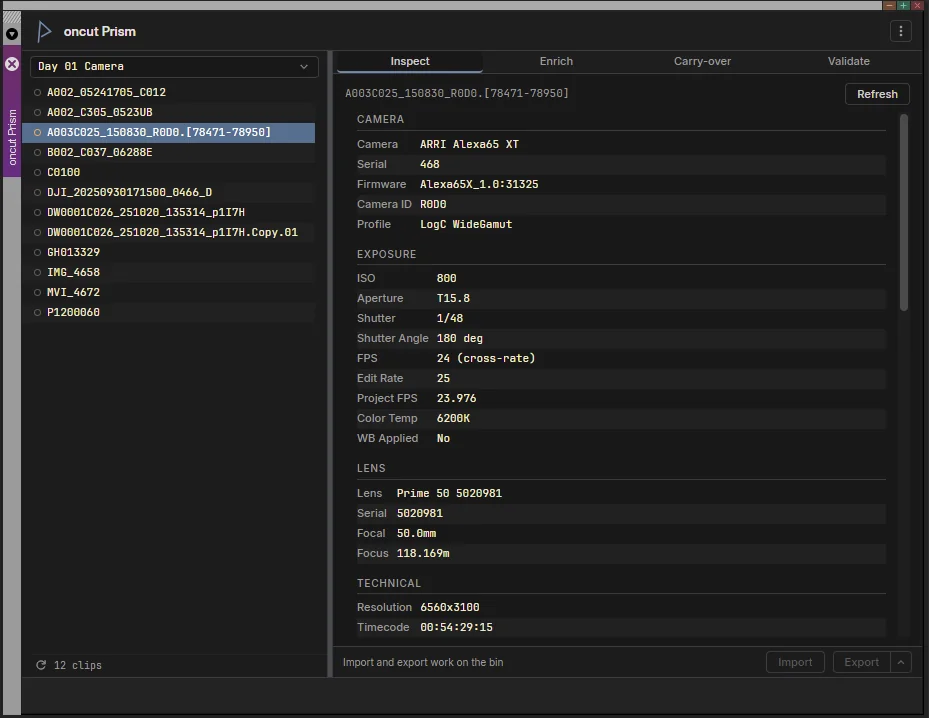
The panel inside Media Composer, reading an ARRI Alexa 65 clip.
Prism connects the clips in your Media Composer bins with the metadata stored in their original camera media, without retyping it. It plans first, and writes only after you review and apply.
Inspect, validate and enrich your Media Composer bins , Windows 11 , your media is never changed
Windows 11, 14-day free trial
What it does
The camera wrote it down. Prism puts it in the bin.
Media Composer does not surface the technical metadata of a camera original by itself: the lens, the ISO, the color profile, the camera's own clip name. Prism reads it from the files, shows it in the panel, and writes it into bin columns where it survives transcodes and relinks. It reads RED, ARRI and Blackmagic RAW through their makers' SDKs, among other formats.
Inspect
Read a clip’s camera metadata from its original file: camera body and serial, lens, ISO, aperture, shutter, white balance, color profile, timecode. The panel shows what the camera wrote, not what the bin happens to hold.
Enrich
Write that metadata into bin columns, as a plan you review before anything is written. Prism writes its own columns and Disk Label, never Tape, Start, End or Name.
Carry-over
Move the metadata of the camera originals onto the transcodes made from them, matched by an anchor you can see: Tape and Start TC for tape-based workflows, Disk Label and Start TC for file-based ones.
Validate
Check a bin for the problems that break a relink later: missing relink anchors, sources that cannot be found, frame rates that do not match the project. Each finding says what to do and jumps to the clip.
ALE in and out
Import a DIT’s ALE, or export what the bin holds, so the metadata travels with the project.
Reads, never changes
Prism opens camera files to read their metadata and does nothing else to them: it never modifies, moves, renames or deletes a media file. What it writes is metadata in your bins, and only when you apply a plan you have reviewed.
A look inside
One panel, four tabs
Requirements
What it needs
- +Windows 11. Prism 1.0 is Windows only; Windows 10 is not supported.
- +Avid Media Composer 2024.6 or a higher version number, with your own Media Composer license. Tested on 2025.12.1, 2025.12.2 and 2026.8.
- +Local port 3981 free. Media Composer loads the panel from Prism's backend on the same machine; nothing is served to the network.
- +Administrator rights to install. Prism installs for the whole computer, and one Windows user at a time runs it.
Prism is two pieces: the panel inside Media Composer, and a small backend that runs on the same machine, starts when you sign in to Windows, and reads the camera files. Both install together, with the oncut License Manager, which holds the license.
Avid runs several release lines side by side, so the minimum is a version number and not a date: a 2023.12 patch is below it even when it came out after 2024.6. The Save all bins button needs 2025.12.2 or 2026.8; on 2025.12.1 Prism reminds you to save by hand instead.
Pricing
Pay once. Keep it.
Windows 11
Pricing soon
One payment, no subscription.
- + 14-day free trial, same download
- + A perpetual license, on one computer at a time, or on as many as the seats you buy
- + 12 months of updates from the day the license is issued, every release in that time whatever its version number
- + After that, the license keeps running every release published up to its last day; an extension of the update period is sold separately
- + Key by email within one business day of your payment
- + Refund within 14 days, no questions asked
- + Email support at support@oncut.gr
Sales open with version 1.0.0. Leave a message below and we will email you when it is out. You can read the End-User License Agreement, the terms of sale and the refund policy now.
The license needs the oncut License Manager and an internet connection
Prism runs licensed only together with the oncut License Manager, a small program that Prism's installer puts on the computer once, for all its users and for every oncut app. You add the key there, and the License Manager activates it on this computer over the internet, then renews the activation by itself while the computer is online. Prism itself never goes online: it reads the license and its activation from this computer and checks them offline.
A computer that stays offline keeps running until its activation runs out, within 14 days, and connecting again renews it. A computer that is never online can be activated through support, with a request file the License Manager makes. Moving the license to another computer is one click, Deactivate, in the License Manager. All of it, with what the License Manager sends and what the server keeps, is on the License Manager help page and in the privacy policy.
Every release is listed below with the day it is entitled on, and the installers of earlier releases stay available there, so you can always install the latest release your license covers.
Checkout is run by Stripe. Your order is sold through Link, Stripe's merchant of record, which charges you, handles VAT and sends your receipt. oncut issues your license key and supports the software. Media Composer is a separate product and is not included.
Download
oncut Prism
Every release stays listed here with the day it is entitled on. A license runs every release entitled on a day within its update period, so the newest release whose date is inside your period is the one to install. The same download is the 14-day free trial.
No release is out yet. Version 1.0.0 appears here the day its files go online.
Run the installer and accept the End-User License Agreement, which it shows first. Prism installs for the whole computer, so Windows asks for administrator approval; the oncut License Manager's own setup, which the installer includes, asks once more. When Setup finishes, the License Manager may open to ask for a license key: close it to carry on with the trial.
FAQ
Questions
Which Media Composer versions does it work with? +
Avid Media Composer 2024.6 or a higher version number, on Windows 11. Avid ships several release lines side by side, so what counts is the version number, not the release date. Prism has been tested on Media Composer 2025.12.1, 2025.12.2 and 2026.8. The Save all bins button needs 2025.12.2 or 2026.8: on 2025.12.1 Media Composer accepts the command and saves nothing, so Prism reminds you to save by hand there instead. Media Composer itself is not included.
Can I try it before buying? +
Yes. The download is the full product and runs free for 14 days from its first start, once per computer, with nothing held back. The first three days need no internet; to carry on after them, the computer has to be online once so the oncut License Manager can confirm the trial. A license key turns the same installation into the licensed version, so there is nothing to reinstall.
Is it a subscription? +
No. You pay once, and the license does not expire. It includes every release published within 12 months of the day it is issued, whatever the version number, and it keeps running those releases for good. A release published after that does not run with the license, and Prism says so: install the latest release your license covers, from the list on this page, or extend the update period, which is sold separately and re-issues the same license.
What does Prism do when my updates have ended? +
Nothing changes on the release you run. If you install a release published after your update period ended, the panel shows Updates ended, names the day, and keeps every earlier release running with your license. Security and compatibility fixes for a release you are entitled to run reach you whether or not the update period has ended.
How is my license delivered? +
By email, to the address you used at checkout, within one business day at the latest. In the oncut License Manager, which Prism's installer puts on the computer, choose Add license key and paste it; the License Manager activates it on this computer over the internet and renews the activation by itself from then on. Prism notices within a few seconds, and the trial badge disappears.
Does Prism need an internet connection? +
Only for licensing, and only through the oncut License Manager: Prism itself never goes online. An activation lasts 14 days, and the License Manager renews it by itself whenever the computer is online, about daily, without showing anything. A computer that stays offline keeps running until the activation runs out, and connecting again renews it. An edit room with no network at all can be activated through support, with a request file the License Manager makes; see the License Manager help.
What does the License Manager send, and what does Prism send? +
Prism sends nothing: your media, projects, metadata and bins stay on your computer, and Prism makes no network connections. When it activates, renews or deactivates, the License Manager sends oncut’s activation server the license key, a machine ID (a one-way hash of the computer’s own identifier) and which operating system runs. For a trial it sends the machine ID, the system and the day the trial started, nothing about you or your work. The privacy policy says what the server keeps and for how long.
Can I move the license to another computer? +
Yes. Open the oncut License Manager on the old computer and choose Deactivate; its seat is free at once, and you add the same key on the new one. A license can free a seat that is still active twice in 30 days. A computer that is lost without deactivating frees its seat when its activation runs out, within 14 days; if you cannot wait, write to us from your purchase email.
I clicked Get a license and nothing opened. Where is the License Manager? +
Its window can open behind Media Composer, which keeps the focus. Look for oncut License Manager on the taskbar, or open it from the Start menu, under oncut.
Does the price include VAT? +
Yes. The price shown is the final price, VAT included. The order is sold through Link, Stripe's merchant of record, which works out the VAT for your country, collects it and sends you the receipt. Checkout may show the amount in another currency first.
Can I get a refund? +
Yes. Ask within 14 days of receiving your license key and you get the full amount back, VAT included, no reason needed. See the refund policy for details.
What happens to my license if I uninstall or update? +
Installing a newer version over an existing one keeps your preferences, your license activation and your metadata history. Uninstalling removes the panel and the backend and keeps your license, its activation, your trial status, your history and your preferences, so a reinstall does not ask for the key again. The License Manager stays for your other oncut apps; remove it in Settings, Apps, if you no longer use any.
The End-User License Agreement, the terms of sale, the refund policy, the privacy policy and the License Manager help.
Avid and Media Composer are trademarks or registered trademarks of Avid Technology, Inc. in the United States and other countries. All other product and company names are trademarks of their respective owners. oncut Prism is an independent product and is not affiliated with, sponsored or endorsed by Avid Technology, Inc. or any other company named on this page.
Get in touch
Contact
Questions about oncut Prism, licensing, or a purchase? Send us a message and we'll get back to you.
- Support
- support@oncut.gr
- Location
- Athens, Greece