oncut KeyLang
Keyboard layout checker
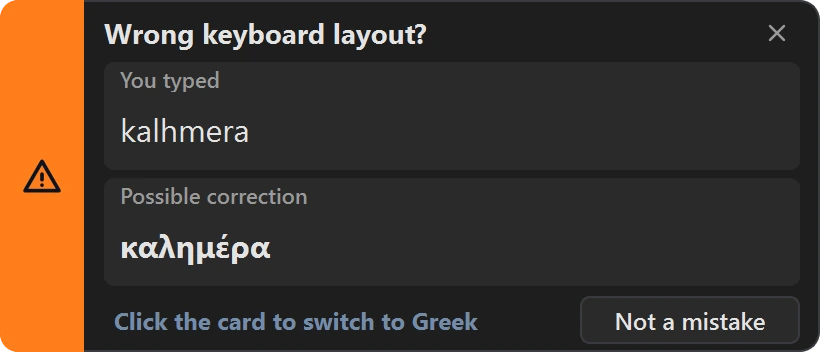
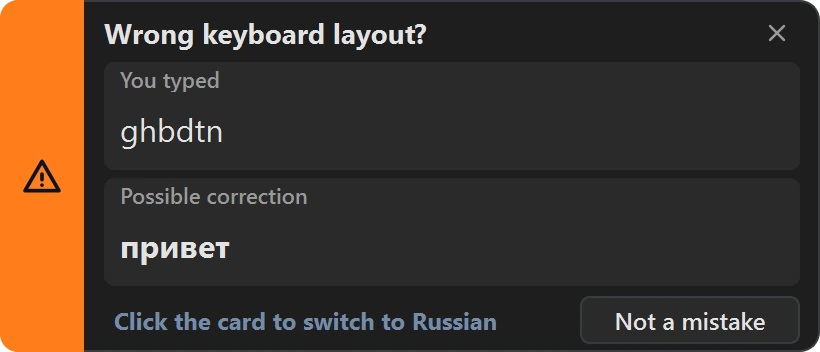
The warning, as KeyLang shows it after one word, here in Russian and Greek.
Eight languages, from Greek and Russian to Hebrew and Arabic , Windows and Linux , nothing leaves your computer
Windows 10 and 11, 14-day free trial, then €9.90 once • Linux, free
A look inside
One window for every setting
What it does
Catches the wrong layout before the sentence does
Nothing is broken when it happens. The active layout is simply not the one your hands are typing in, and the keys do not tell you. Usually you notice a word later, or a sentence later, and retype it. KeyLang notices first.
Warns after one word
Every word you finish is checked, on your computer, against built-in word lists and letter patterns for each language. It waits for a whole word, so an abbreviation does not set it off.
Switches with one click
It warns first: click the warning and the app you are typing in changes layout. Automatic switching is there if you want it, and off by default. "Not a mistake" adds the word to your learned words, so KeyLang does not warn about it again.
Fixes what you already typed
Select the text and press the Convert and replace shortcut (Ctrl+Alt+Shift+R unless you change it): it is converted and replaced where it stands, capitals kept and Greek accents restored. Or convert to the clipboard, or paste it into the Convert page.
Eight languages
Arabic, French, German, Greek, Hebrew, Russian and Ukrainian, each with English, and non-Latin layouts against each other, such as Hebrew and Greek.
Stays out of the way
No window, only a tray icon. Pause it for 15 minutes or an hour, switch it off in chosen applications, start it when you sign in. Its alert sounds play even with system sounds off.
Nothing leaves your computer
No telemetry, no crash uploads, no automatic updates. What you type is examined in memory and discarded; the log records word lengths, never words.
How it works
It reads every word twice
| You typed | Layout on | You meant |
|---|---|---|
| lvpfh | English | مرحبا (Arabic) |
| руддщ | Russian | hello (English) |
| qvec | English | avec (French) |
| ywei | English | zwei (German) |
| kalhmera | English | καλημέρα (Greek) |
| akuo | English | שלום (Hebrew) |
| ghbdtn | English | привет (Russian) |
| ghbdsn | English | привіт (Ukrainian) |
German and French share most keys with English, so only words that differ on the keyboard (Y and Z on German; A, Q, Z and W on French) can be told apart.
For every word you finish, KeyLang asks two questions. Is this a real word on the layout that is on? And read on the other installed layout, is it a real word there? When only the second answer is yes, you were typing on the wrong layout. It works in both directions. A word counts as real when the built-in word list has it, or when its letter patterns are typical of the language, which covers names and word forms no list holds.
The key maps come from the layouts installed on your computer, so UK, Dvorak or Colemak work with their real keys. Greek accents typed as dead keys are understood too, which is how k;ane is recognized as Greek even though kane looks like English.
Replacing text is held to a stricter rule than warning. A correction is written over your text only when the word is in a dictionary, the bundled one or one you taught it. A warning you ignore costs you a glance; a wrong replacement would cost you your text.
Editions
Pay once on Windows. Free on Linux.
Windows 10 and 11
€9.90
VAT included. One payment, no subscription, for one computer.
- + 14-day free trial, same download
- + A license that does not expire
- + Key by email within one business day of receiving your computer's ID
- + Free replacement key if you reinstall Windows
- + Refund within 14 days, no questions asked
- + Email support at support@oncut.gr
Sales open with version 1.0.1. Leave a message below and we will email you when it is out. You can read the End-User License Agreement and the refund policy now.
Linux, X11 and Wayland
Free
No trial, no license key.
- + One AppImage, nothing to install
- + The same detection and conversion
- + Any desktop in an X11 (Xorg) session
- + Wayland on KDE Plasma and GNOME, set up at the first start
With version 1.0.1
macOS
Not yet
There is no Mac version so far.
Leave a message below if you would use one, and we will let you know when it exists.
Get in touchCheckout is run by Stripe. Your order is sold through Link, Stripe's merchant of record, which charges you, handles VAT and sends your receipt. oncut issues your license key and supports the software.
FAQ
Questions
Which languages does it cover? +
Arabic, French, German, Greek, Hebrew, Russian and Ukrainian, each paired with English, and non-Latin layouts against each other (Hebrew and Greek, for example). German and French share most keys with English, so only the words that differ on the keyboard (Y and Z; A, Q, Z and W) can be told apart. On Windows, KeyLang also warns when a Chinese Pinyin input method is left on while you type English.
Does it send what I type anywhere? +
No. Detection, conversion and learned words all work on your computer, and KeyLang makes no automatic network connections: no telemetry, no crash uploads, no update checks. It keeps no record of what you type either. Words are checked in memory and discarded, and the only words it saves are the ones you teach it. The Privacy Policy has the details.
Which systems does it run on? +
Windows 10 and 11, and Linux: in an X11 (Xorg) session on any desktop, and under Wayland on KDE Plasma and GNOME. Wayland does not let an ordinary application see what is typed into other windows, so there KeyLang needs a one-time setup, which it offers and carries out itself at its first start; it can undo it just as easily. Other Wayland desktops are not supported. There is no macOS version yet.
Can I try it before buying? +
Yes. The Windows download is the full application and runs free for 14 days from its first start. A license key turns the same installation into the licensed version, so there is nothing to reinstall. The Linux edition is free and needs no key at all.
Does it change what I type? +
No. KeyLang never rewrites text you have already typed. When a word looks like it was typed on the wrong layout, it warns you, and one click switches the layout for what you type next. If you would rather not click, it can switch the layout by itself as soon as it notices (Settings, Detection); that still leaves the word you typed as it is. Converting text that is already written is a separate command you choose to run, on the text you select.
What happens when the trial ends? +
KeyLang stops watching the keyboard and shows where to enter a license key. Your settings and learned words stay as they are, and once the key is in, it carries on exactly where it stopped. Nothing needs to be reinstalled.
Is it a subscription? +
No. You pay once, and the license does not expire.
How is my license delivered? +
Every license is for one computer, so the key is made for yours. After you pay, open Settings, About & license in KeyLang, copy this computer's ID and email it to support@oncut.gr from the address you used at checkout. We email your license key within one business day of receiving it. Your trial keeps running in the meantime.
What if I reinstall Windows or change computers? +
A key is made for one computer at a time. Reinstalling Windows changes your computer's ID, and a new computer has its own, so the key no longer matches. Email the new ID to support@oncut.gr from your purchase email and we send you a replacement key, free.
Does the price include VAT? +
Yes. The price shown is the final price, VAT included. The order is sold through Link, Stripe's merchant of record, which works out the VAT for your country, collects it and sends you the receipt. Checkout may show the amount in another currency first. You can always choose to pay €9.90 in euros instead, which also avoids the currency conversion fee checkout adds to other currencies.
Can I get a refund? +
Yes. Ask within 14 days of receiving your license key and you get the full amount back, VAT included, no reason needed. See the refund policy for details.
Does it work in applications running as administrator? +
Not from a normally started KeyLang: Windows deliberately stops ordinary programs from watching or switching applications that run as administrator. The manual that comes with KeyLang (Help, in the tray menu) explains the options and their trade-offs.
How do I remove it? +
On Windows, uninstall it from Settings, Apps, like any other program. The uninstaller asks whether to remove your settings and learned words as well, and it stops KeyLang starting when you sign in. On Linux, quit KeyLang, run it once with --uninstall-cleanup, which also undoes the Wayland setup if it made one, and delete the AppImage. Add --remove-user-data to remove your settings and learned words too.
Get in touch
Contact
Questions about oncut KeyLang, licensing, or a purchase? Send us a message and we'll get back to you.
- Support
- support@oncut.gr
- Location
- Athens, Greece